
The Mercurio platform is a digital tool provided by the Spanish Public Administration that has completely changed the game for expats and foreigners in Spain. Gone are the days of camping out for an appointment at the immigration office (Oficina de Extranjería).
Its main goal is to speed up the submission of applications and documents for citizens and their representatives (lawyers, gestores, etc.), effectively cutting down waiting times and saving you from unnecessary trips to government offices.
While digital solutions are becoming the norm in 2025, many users still find the system a bit daunting. How do you access it? What exactly can you file? In this guide, we provide a clear, step-by-step manual so you can handle your paperwork electronically, securely, and without headaches.
What is the Mercurio platform and what can you do with it?
The Mercurio platform allows you to present a wide variety of immigration applications, making it an indispensable tool for living in Spain.
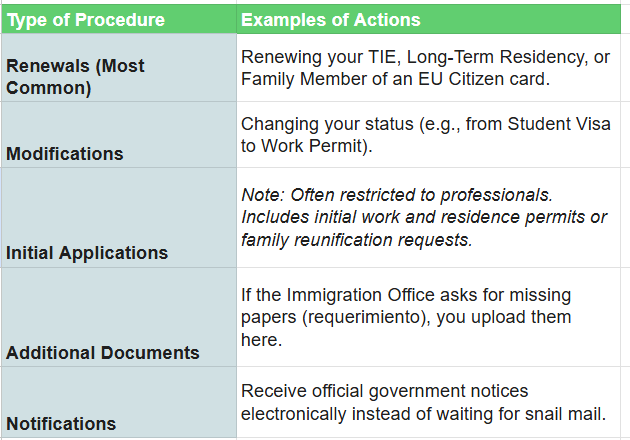
However, it is important to distinguish between what an individual can do and what a registered professional (like a lawyer) can do. While professionals have broader access to “Initial Applications,” individuals primarily use it for Renewals.
Here is a breakdown of the most common procedures:
Essential requirements to use the platform
To use the Mercurio platform, you must meet one non-negotiable requirement: having a valid Digital Certificate (Certificado Digital).
This is an electronic ID that verifies your identity securely before the Public Administration. If you don’t have one yet, you can obtain it through the FNMT (Fábrica Nacional de Moneda y Timbre).
Once installed on your browser, you can access the platform via the Sede Electrónica (Electronic Headquarters) of the Ministry of Territorial Policy.
Pro Tip: Make sure you also have the AutoFirma software installed on your computer. You will need it to digitally sign the documents at the final step.
Step-by-step guide to using the Mercurio platform
The process is generally intuitive, but Spanish administrative sites can be tricky. Follow these steps to ensure success:
1. Access the portal
Go to the Sede Electrónica and search for “Mercurio.” You will usually see options for “Telematic Renewal” (Renovación Telemática). Log in using your Digital Certificate.
2. Select your procedure
On the main menu, choose the type of application you need to file. The system categorizes them by type (e.g., General Immigration Law or EU Citizens).
3. Fill in the form
The system will guide you through a digital form (similar to the paper EX forms). Fill in your personal data and file details carefully. Double-check everything—typos here can cause delays in your resolution.
4. Attach your documentation
This is a critical step. You must upload scanned copies of all required documents (Passport, TIE, Empadronamiento, work contract, etc.).
- Format: Must be PDF.
- Quality: Ensure they are legible but not too heavy (files usually have a size limit, often around 6MB per file).
5. Sign and send
Once the form is filled and documents are attached, click to sign. The Mercurio platform will launch AutoFirma to validate your ID. Once signed, the application is instantly registered with the Immigration Office.
Don’t forget the receipt:
After sending, the system generates a PDF receipt (Resguardo) with a file code (Número de Expediente). Save this immediately. You will need this code to track the status of your application later (“En trámite,” “Resuelto,” etc.).
Why switch to digital?
Using the Mercurio platform simplifies life in Spain significantly. It gives you control over your file, provides instant proof of submission (stopping your legal clock), and lets you avoid the dreaded hunt for in-person appointments.
However, technology isn’t perfect. If you feel overwhelmed or the system gives you errors, official government guides are available. Alternatively, relying on a professional can ensure the specific legal boxes are ticked correctly.
If you need personalized assistance, at Entre Trámites we offer management and tax advisory services for freelancers and SMEs. You can contact us through this contact form for us to call you, or if you prefer, you can schedule a free consultation or write to us on WhatsApp.
Frequently Asked Questions
Can I use the Mercurio platform for my very first residency application in Spain?
It depends. Generally, the public version of Mercurio is designed for renewals of existing permits. Many initial applications (like a first-time non-lucrative visa application made from Spain) often require a professional representative (lawyer or Gestor Administrative) to file them digitally on your behalf, or they must be done in person/at a consulate.
What happens if the platform crashes while I am uploading documents?
This can happen. If the system crashes, try clearing your browser cache or switching browsers (Chrome and Firefox usually work best). If the problem persists, take screenshots of the error. If you are close to a deadline, this evidence is crucial to prove you attempted to file on time.
Is the “Resguardo” (receipt) valid proof of legal stay?
Yes. Once you have successfully submitted your renewal via the Mercurio platform, the Resguardo proves that your application is processing. If your current card expires while you are waiting for the resolution, this document acts as proof that you are still legally in Spain pending a decision.